
DJIA Cache – Cache Tab
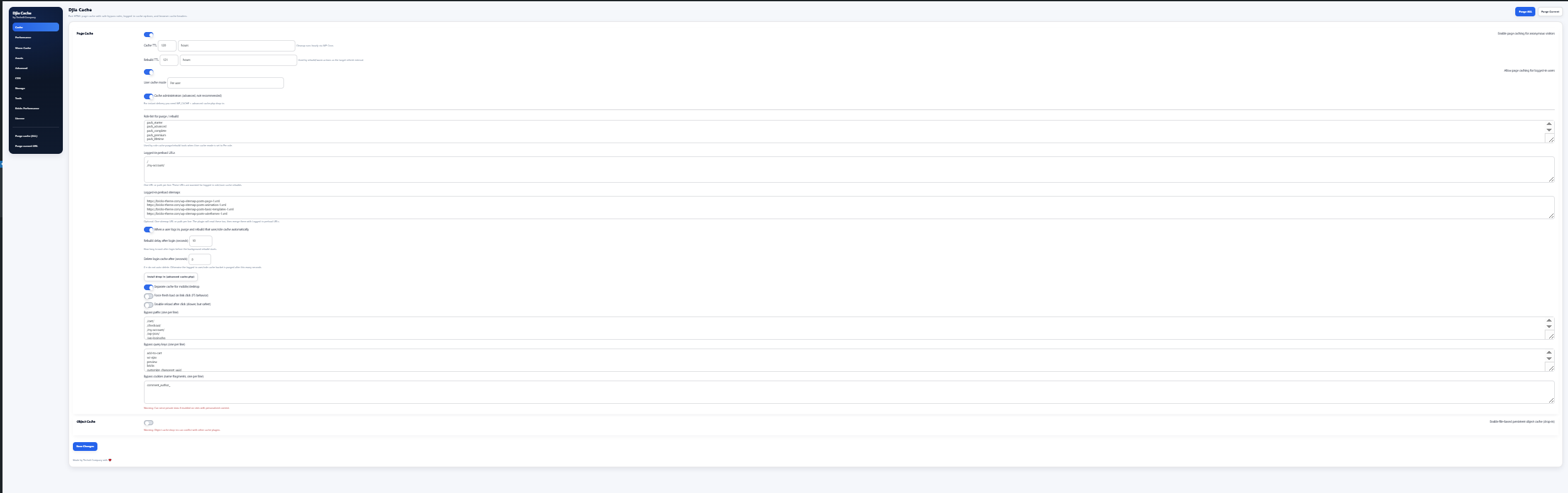
The Cache tab contains the main settings used to control how DJIA Cache handles page caching, logged-in caching, cache rebuilding, and object caching.
Sections:
Page Cache
Enable page caching for anonymous visitors
Enables full HTML page caching for visitors who are not logged in.
This significantly reduces:
- server load
- page generation time
- database queries
Cached pages are served instantly without running WordPress PHP on every request.
Cache TTL
Defines how long cached pages remain valid.
Example:
120 hours
After this time the cache expires and will be regenerated.
Cleanup runs automatically via WP-Cron.
Rebuild TTL
Defines how often the plugin should rebuild or warm the cache.
Rebuild generates new cache files before the previous ones expire to ensure the cache always stays warm.
Example:
121 hours
Allow page caching for logged-in users
Enables caching for logged-in users.
Only enable this when:
- logged-in users see the same content
- there is no personalized or dynamic data
User Cache Mode
Controls how cache is generated for logged-in users.
Off
No cache for logged-in users.
Per Role
Cache is created per user role.
Example:
- subscriber
- customer
- editor
Users with the same role share the same cache.
Per User
Each logged-in user receives their own cache bucket.
This is the safest option when content differs per user.
Cache administrators (advanced, not recommended)
Allows caching for administrators.
⚠ This is not recommended for development or admin areas.
Requires:
WP_CACHEadvanced-cache.phpdrop-in
Role list for purge / rebuild
Defines which roles should have their cache purged and rebuilt.
Example:
subscriber
customer
pack_free
pack_starter
pack_advanced
Used when User Cache Mode = Per role.
Logged-in preload URLs
List of URLs used to preload cache for logged-in users.
Example:
/
/my-account/
Each URL must be placed on a new line.
These URLs are used during cache rebuild or warm operations.
Logged-in preload sitemaps
List of sitemap URLs used to generate cache.
Example:
https://example.com/wp-sitemap-posts-page-1.xml
https://example.com/wp-sitemap-posts-post-1.xml
https://example.com/wp-sitemap-taxonomies-category-1.xml
The plugin reads URLs from these sitemaps and uses them for automatic cache warming.
When a user logs in, purge and rebuild that user/role cache automatically
When enabled, the plugin will:
- purge the cache bucket
- rebuild cache for that user or role
This ensures logged-in users always see fresh content.
Rebuild delay after login
Defines how long the plugin waits before starting the rebuild process after login.
Example:
10 seconds
This delay allows WordPress login processes to fully complete.
Delete login cache after
Automatically deletes logged-in user cache after a specified number of seconds.
Example:
300 seconds
If set to:
0
the cache will not be automatically deleted.
Install drop-in (advanced-cache.php)
Installs the WordPress advanced cache drop-in.
This allows the cache to load before WordPress starts, enabling maximum performance.
Benefits:
- faster response time
- earlier cache interception
- reduced PHP execution
Separate cache for mobile / desktop
Creates separate cache versions for:
- mobile devices
- desktop devices
Useful when the theme loads different layouts or CSS for mobile visitors.
Force fresh load on link click (F5 behavior)
When a visitor clicks an internal link, the plugin sets a short-lived cookie that forces the next request to bypass the page cache.
This behaves similarly to pressing F5 refresh.
Double reload after click (slower, but safest)
After clicking a link the browser performs two requests:
- initial load
- secondary reload
This helps resolve rare cases involving:
- browser cache
- proxy cache
- CDN edge caching
Note: This slightly slows down navigation.
Bypass paths
Requests matching these paths will skip the page cache.
Example:
/cart/
/checkout/
/my-account/
/wp-json/
/wp-login.php
Typically used for:
- WooCommerce
- login pages
- API endpoints
Bypass query keys
If a request contains any of these query parameters, caching will be skipped.
Example:
add-to-cart
wc-ajax
preview
bricks
customize_changeset_uuid
Bypass cookies
If a visitor has cookies matching these fragments, page caching will be bypassed.
Example:
comment_author_
⚠ Warning:
Using cookie bypass on sites with personalized content may cause private data to be served from cache.
Object Cache
Enable file-based persistent object cache
Enables a file-based persistent object cache.
This stores WordPress objects between requests, reducing database queries and improving performance.
Benefits:
- fewer MySQL queries
- faster backend responses
- improved scalability
⚠ Warning:
Object cache drop-ins can conflict with other caching plugins that already implement their own object cache systems.